
Dimoff's Facebook Bot
Публикувано: 2019-03-08 12:50:22
 Dimoff Bot
Dimoff's Facebook Bot is an extension for Chrome; Download it from the Chrome web store.
Click on the bot icon in your extensions to activate/disactive the bot. Green background means the bot is running, red background means the bot is disabled.


Type dimoff help or botName help (the name you gave to the bot) in a Facebook chat to see what the bot is currently capable of.
If you do not have Facebook opened somewhere in your browser or disactivate the extension, the bot will not respond to commands :).
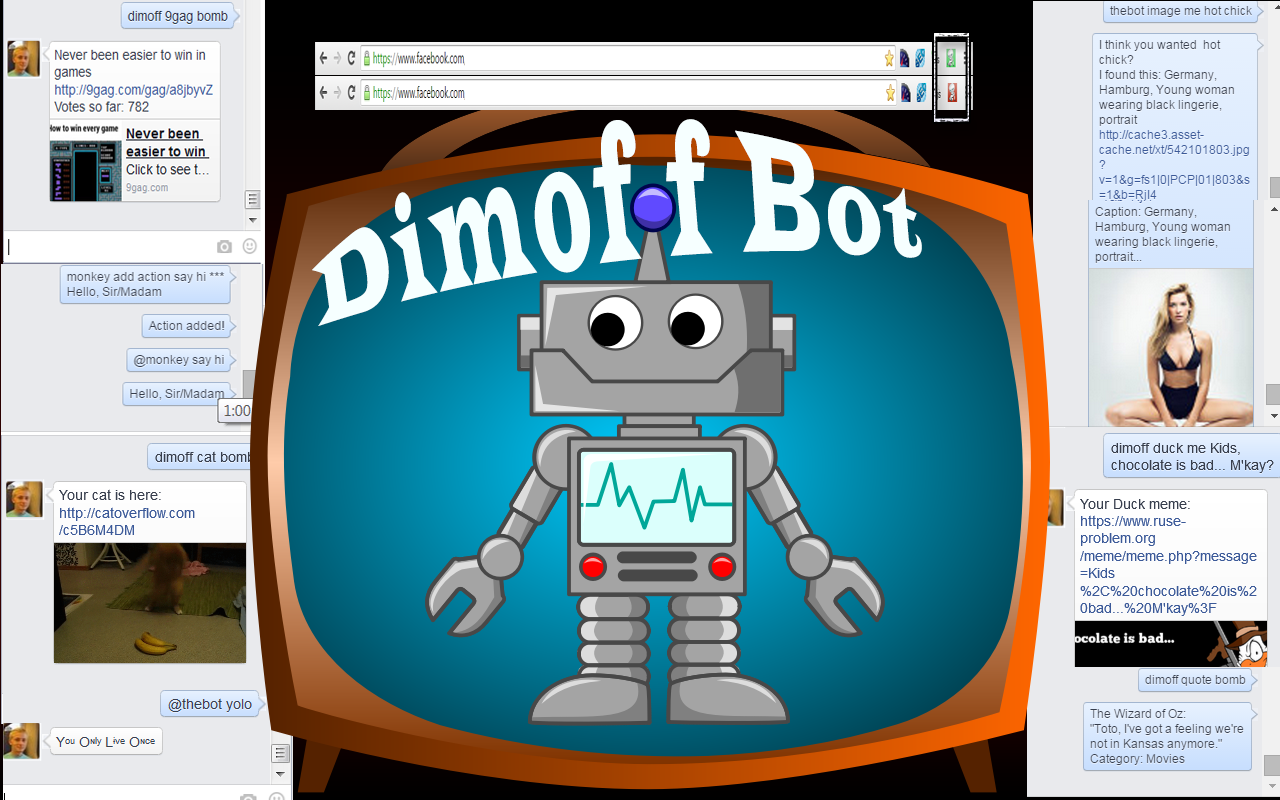
A Facebook bot that works across all private and group chats. You can give it whatever name you like. It can show specific images in the particular chat depending on the query, launch different kinds of bombs (which are random) - 9gag,cats,quotes,poetry.
It can learn new commands and respond to them with a predefined text. You can create YouTube playlists from which the people in your chats can get random songs whenever they want and more.
When the bot is active its robot icon has a green background and when it is disabled - it has a red background . When the bot is active it opens automatically any new chat messages that arrive in one of your Facebook tabs in order to look for commands and respond, if any.
If the bot is not working, try stopping and then starting it again
The bot is active only in one of your Facebook tabs no matter if you refresh it and when you close that tab it moves to one of the other Facebook tabs or waits for Facebook to be opened unless you stop it manually.
Thus, it is best to start the bot in a Facebook tab and use another one to browse your Facebook as some of the messages by bot take around 3 seconds to send.
Here is the current response to help in a chat:
   NOTE: Text in all-caps means that you must provide your own input...

    Queries:
    dimoff duck me TEXT - creates a duck meme with the selected text
    dimoff youtube me TEXT - receives possibly 2 video results in response to the text
    dimoff image me TEXT- shows one image result for your keyword

    Bombs:
    dimoff poetry bomb - spits a random poem
    dimoff 9gag bomb - spits a random funny picture from 9gag
    dimoff quote bomb - spits a random movie or famous quote
    dimoff cat bomb - spits a random cat gif

    Adding custom behavior to the bot:

    dimoff add action ACTIONNAME *** DESIREDRESPONSE - adds a permanent action to the bot, whenever you add an action and call its name with @dimoff ACTIONNAME, then DESIREDRESPONSE will be messaged by the bot
    dimoff delete action ACTIONNAME - removes the given action
    @dimoff ACTIONNAME - prints the DESIREDRESPONSE for that action
    @dimoff list - shows all added custom actions
    @dimoff random - sends a random custom action

    User-generated content (YouTube Playlist, Riddles):

    YouTube:
    dimoff youtube bomb - spits a random song from the playlist you created and maintained
    dimoff delete song YOUTUBEVIDEOLINK - deletes a YouTube video from the playlist
    dimoff add song YOUTUBEVIDEOLINK - adds a YouTube video to the playlist.

    Riddles:
    dimoff riddle bomb - spits a random riddle
    dimoff add riddle RIDDLE *** RIDDLEANSWER - adds a riddle with a specific answer
    dimoff delete riddle RIDDLENUMBER - deletes a riddle with a particular number (shown when bombing)
    dimoff answer RIDDLENUMBER - shows the answer to a riddle with a given number (the number is shown when users type dimoff riddle bomb)
Dimoff's Facebook Bot Examples

Dimoff Facebook Bot Patches
0.1.2
1.Added the possibility to add multiple custom actions to the chats.
Examples:
        @bot random @bot fu @bot give a rose
        You mean so much to me @bot give a rose @bot say i love you
If you want to add a text after the custom action and declare to the bot that it is not a part of the action you should use the | sign.
 Examples:
        @bot say hi | You will say hi to her, won't you? @bot say bye
2. DISABLED people who are NOT bot owners (the one whose Facebook is running) from adding and deleting actions and adding songs and riddles
3. Added some basic safeguards against creating infinite loops with custom actions. If you repeat the same action several times, it will require you to try a new one. This is against creating an action that calls itself.
4. Fixed a bug that would make the bot to not start when you open Facebook if you activated the extension without any Facebook tab already opened in your Chrome browser.
0.1.3
1. You cannot add the same Youtube link twice
2. You can use the command botName delete song YOUTUBELINK to delete songs from your playlist.
Examples:
        dimof delete song https://www.youtube.com/watch?v=ABhDiXbUaBE
3. Songs in the YouTube playlist will not trigger "Invalid link" error from time to time.
Notice: riddle bombs as well as YouTube bombs are generated from stuff that you add to the bot unlike the other bombs.
4. Adding your own riddles and bombing people with them now works.
5. You can delete riddles using botName delete riddle RIDDLENUMBER
 Examples:
        >dimoff add riddle What is brown and sticky? *** A stick
        Riddle added!
        >dimoff riddle bomb
        {0}  What is brown and sticky?
        >dimoff delete riddle 0
        Riddle removed!
6. Fixed an issue that caused links not to be added in youtube playlists and custom actions
7. Custom actions can contain text besides a link and will still be handled as URLs
0.2
1. Added a new command - dimoff youtube me TEXT
The command returns 2 results for a given search. They could be YouTube videos, YouTube channels or both
Examples:
        botname youtube me my generation

